
How I Tried Wan 2.5: The AI Video Generator That Actually Talks
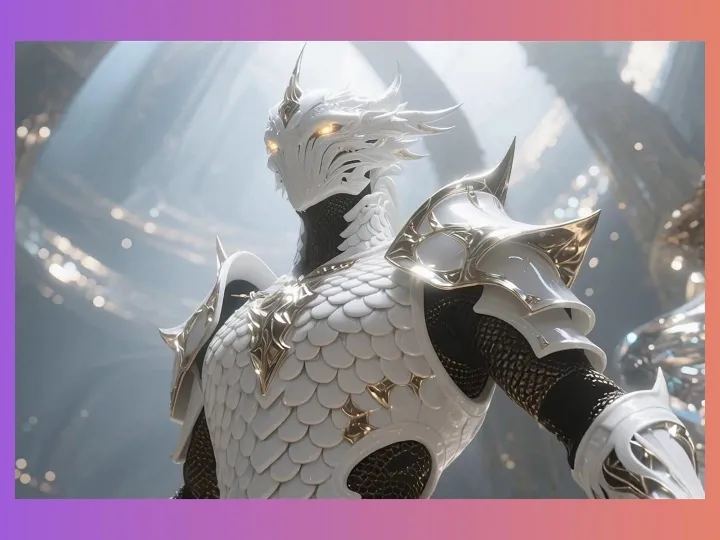
In my journey with AI, video creation has always been a headache. The big question has been: how do you make videos and audio at the same time? Almost all AI models I’ve tried—Lingling, Veo, Sora—could only produce silent clips. You’d have to generate the video first, then manually add voiceovers, sound effects, background music, and lip-sync everything. A simple 10-second clip could take hours.
But everything changed in September when Alibaba Cloud released Wan 2.5 AI video generator free. And honestly, it blew me away.
This is the first AI video model that can actually talk. You just input a line of text, and it automatically generates a full video with audio, sound effects, and background music. I tried it out on PixaryAI, and it was like magic.
Wan 2.5 Entrance👇
From “Mute” to “Speaking”: AI Videos Have a Soul
Before, creating an AI video felt like running two separate studios—one for animation and one for sound. But with Wan 2.5 free online, audio and video sync perfectly. On PixaryAI, all I had to do was create Wan video, just input a prompt, click “generate,” and a few minutes later, I had a fully synchronized clip.
Flexible Voices That Match Your Story
The Wan 2.5 AI text to video generator free doesn’t just sync audio—it can intelligently generate all kinds of voices from your text prompts.
For example, I typed in:
A man in a gray double-breasted suit, pointing forward in an American city at night, looking excited. Style inspired by crime movies, medium shot, focusing on his actions and expressions.
Then for the dialogue:
The man suddenly says, “Do you think you can run away? Aren’t you worried about your wife and kids?” Angry expression, clear voice, American accent.
(Formula: Character speech + emotion + tone + speed + timbre + accent)
The result? His facial expression, tone, and the voiceover all felt super real.
I also tried a fun one:
Trump on stage doing a stand-up, saying: “We will build a wall, a big wall! I will make America great again!” Excited tone, moderate speed, slight dance while speaking.
The Wan 2.5 video generator online nailed it perfectly.
Environmental Sounds and Background Music
While testing, I also experimented with adding sound effects and music directly from text prompts. I wanted to see if the system could really capture environmental context, and it did.
- Sound Effects = Material + Action + Environment
Example: A glass ball falls on a table in a quiet room.
The output had a crisp “ping,” just like in real life. It was amazing to see text transform into audio so seamlessly with Wan 2.5 free image to video.
- Background Music = Music/score + Style
Example: On a rainy night, an American girl walks along a country path, a cool breeze whistling through the air, accompanied by eerie and mournful sounds.
The AI automatically added chilling, lonely music that perfectly matched the vibe.
Honestly, the text-to-video output alone looked amazing. And if you want even higher quality, you can use the image-to-video function, which I tried for longer clips.
Not Just Talking: Better Video, Smarter Moves
As I continued testing, I realized Wan 2.5 AI video generator free online isn’t just about adding voices—it upgrades the entire video experience.
- Video length now goes from 5s to 10s or 15s, so I could test longer clips.
- Resolution upgraded from 720P to 1080P, making details much clearer on my screen.
- It even understands complex camera directions, which I put to the test.
For example, I typed:
Slowly zoom in, time-lapse, clouds rolling, epic scene.
I watched in awe as the generated video had matching audio, smooth camera movement, and precise environmental effects. It felt like watching a professional short film, except I made it in minutes.
My Tips for Using Wan 2.5 Prompts
From my testing sessions, here’s how I structure my Wan 2.5 generator prompts for best results:
Voice = Character speech + emotion + tone + speed + timbre + accent
Example: A mother holding her child says, “Don’t worry, everything will be fine,” gentle tone, smooth rise, slow speed, soft timbre, American accent.
During my testing, I found this formula made dialogue sound natural even in complex scenes.
Sound Effects = Material + Action + Environment
Example: The sea was surging and roaring, silence around it.
I used this to simulate environmental audio in a small village scene I generated, and it added incredible realism.
Background Music = Music/score + Style
Example: On a snowy Christmas, a homeless man enjoys the snow alone, surrounded by voices.
Testing this, I noticed the AI could adjust mood and style automatically based on the scene description.
Honestly, I’ve never seen AI video generation this smooth. Whether you want to Wan 2.5 generate video, try free Wan 2.5 video generator, or explore alternatives like Google Veo 3 alternative or Sora 2 alternative, this model is next-level.
From my own experiments, PixaryAI makes it so easy to create Wan video—everything from audio to visuals feels integrated. The experience of testing Wan 2.5 AI video generator free firsthand made me realize this is a game-changer for AI video creators like me.
About the Author



PixaryAI offers unlimited AI content creation to meet all your needs, whether for photos, GIFs or videos.
 Try for Free Now