
My Surprising First Experience with PixaryAI Wan 2.5 as an AI Director
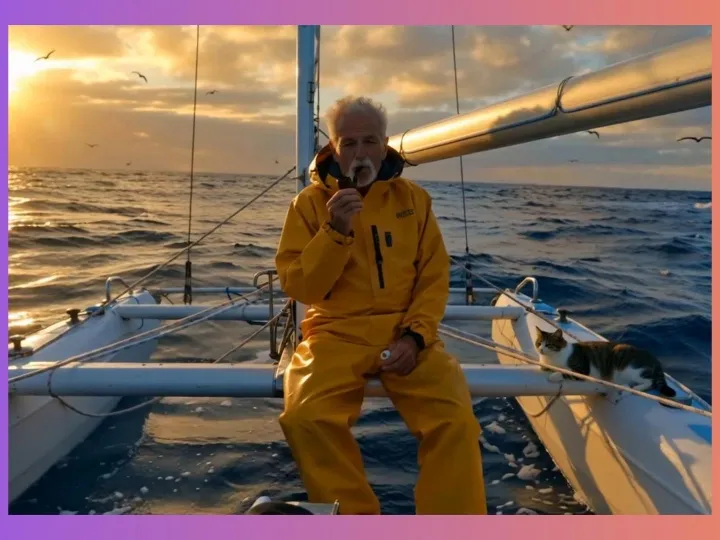
A hands-on look at the Wan 2.5 free video generator and why it might be the best Google Veo 3 and Sora 2 alternative right now.
What Is Wan 2.5? Why Is It Worth Trying? (Wan 2.5 AI Video Generator Free Overview)
After trying more and more AI video-generation tools, Wan 2.5 quickly became one of the few models that made me think, “Wow… this is actually ready for real content creation.” Wan 2.5 comes from Alibaba and is part of a new generation of Wan 2.5 open-source video models. Many people refer to it as a strong Google Veo 3 alternative and even a potential Sora 2 alternative because of how clean and cinematic its results look.
But what truly makes the Wan 2.5 AI video generator impressive isn’t just that it can create video—that’s basic. The real magic is that Wan 2.5 AI free online generation can produce video and audio in a single pass.
With the Wan 2.5 free video generator, the experience feels almost like writing a line of description and instantly getting a professionally shot short film—complete with synced dialogue, tone, and sound effects. Before this, my workflow always required generating visuals, adding AI voiceover, then syncing lip movements manually.
With Wan 2.5, that entire process disappears. The first time I saw the Wan 2.5 AI text-to-video generator free inside PixaryAI produce perfect lip-synced lines, I was stunned.Another advantage is how naturally it understands cinematic language. If I write something like:
“A girl opens the window and smiles at the sunlight.”
Wan 2.5 doesn’t just animate the action—it automatically includes camera push-ins and subtle lighting shifts. This “self-directing” ability is why I think the AI video generator Wan 2.5 finally moves beyond old cut-out-animation style AI videos. It feels like filmmaking—just without the camera crew.
Core Wan 2.5 Gameplay Explained (From Zero to First Video)
A practical guide to using the Wan 2.5 AI video generator free online.If you’re trying Wan 2.5 online free for the first time, don’t worry—the interface looks similar to most mainstream AI video platforms. My own first session took barely three minutes to understand. And PixaryAI keeps the workflow clean and beginner-friendly.
Step 1: Write a Simple Prompt
Start simple:
“A young woman looks at the camera and smiles softly.”
Even with basic text, the Wan 2.5 AI text-to-video engine produces a natural, stable shot.
Step 2: Generate and Downloadthe Video
Waite for few seconds. The video will be ready for preview and download.
Camera Language Tips
One of the most underrated powers of the Wan 2.5 AI video generator free online is its understanding of camera instructions.Prompts like:
- “close-up on her eyes”
- “camera slowly pulls back”
are read as cinematic commands, not simple descriptions.The moment I saw Wan 2.5 automatically adjust camera motion just from my text, I realized this tool was built for creators—not only tech users. If you want to create Wan video that feels like real filmmaking, this is the model to try.
Some Interesting Prompts I’ve Tested (PixaryAI Wan 2.5 AI Text-to-Video)
Below are real examples that worked extremely well with Wan 2.5 AI text-to-video and text-only generation:
1.Cinematic NYC alley chase: Handheld POV shot of panicked informant. Cold tones, high contrast, neon lights. Smooth glide with intense shake for immersive pursuer tension.
When I tried this NYC alley chase in PixaryAI, the Wan 2.5 AI video generator nailed the neon lights and shaky handheld motion. Honestly, using the Wan 2.5 free trial made it super easy to get started, and I can see why it’s a solid Google Veo 3 alternative.
2.Cinematic airport scene: Centered slow-motion handheld shot of lovers' gaze across security line. Warm sunset lighting, high contrast, blurred crowds. Subtle shake for emotional tension.
I generated this airport moment with Wan 2.5 AI text to video, and the emotional slow-motion felt surprisingly natural. PixaryAI provides Wan 2.5 online free, making it an ideal Sora 2 alternative for beginners.
3.In an underwater ballroom, transparent jellyfish glow gently between marble columns. Couples in formal attire waltz gracefully in the center of the dance floor—men in black tuxedos, women in flowing long dresses, their outfits swaying softly in the gentle currents. Sea turtles swim slowly overhead, their reflections cast on the smooth coral floor. The camera moves slowly to the right, capturing this dreamlike scene.
The underwater ballroom rendered beautifully using Wan 2.5 AI text to video inside PixaryAI. It’s one of the easiest places to access the Wan 2.5 free video generator without dealing with complex open source video model setups.
4.Cinematic golden hour scene: Circular surrounding shot of young man in dappled sunlight. Backlighting, warm low-saturation tones. Slow-motion glide with handheld tremor for dreamy nostalgia. Blurred foliage for emotional focus.
This golden-hour shot came out soft and cinematic through PixaryAI’s Wan 2.5 free online tools. If you’re exploring a natural-looking Wan 2.5 video generator free, PixaryAI is a very creator-friendly option.
5.In a pixel art scene, a couple in formal evening wear walk home holding an umbrella. Suddenly, heavy rain pours down; they huddle close, sheltering under the umbrella. The camera pushes in slowly, focusing on their silhouettes in the rain, capturing their gaze at each other and the reflection of city lights in the puddles around them.
PixaryAI handled the pixel-art rain scene smoothly with the Wan 2.5 generator, capturing clean silhouettes and reflections. It’s a great way to create Wan video using the Wan 2.5 video generator online.
6.High-speed chase on a cliffside highway at sunset time, daylight with warm colors, edge lighting from the sun casting dramatic shadows. Two cars race along a narrow winding road carved into steep mountains, one closely tailing the other. The camera tracks left in a fast lateral movement, then slowly tilts down to reveal the rocky terrain far below as the pursued car leans slightly outward over the edge. A medium wide shot captures the entire scene with balanced composition, showing the twisting road, sheer drop-offs, and distant ocean glowing under the golden-hour light. The leading car grips the curve while the chasing vehicle struggles to keep up, both kicking up dust and gravel.
The cliffside chase looked dynamic when generated with the Wan 2.5 AI video generator free inside PixaryAI. For filmmakers needing a lightweight Sora 2 alternative, this workflow is fast and GPU-free.
7.Cinematic racetrack scene: Low-angle medium long shot of jockey-horse leap. High-contrast backlighting, warm tones, silhouettes. Slow-motion freeze with dust for dynamic tension. Scoreboard detail.
Using PixaryAI’s Wan AI video generator, the racetrack leap rendered dramatic slow-motion and crisp silhouettes. You can try the Wan 2.5 free video generator instantly through the browser.
8.Close-up shot transitioning to wide shot, daylight, overcast lighting, cool colors, desaturated tones. A single man clings to a battered wooden plank adrift on the vast ocean. His face fills the frame — gaunt, soaked, with dark stubble and weary eyes reflecting despair. The camera slowly zooms out, revealing his body half-submerged in seawater, arms tightly gripping the plank. As the view widens, the surrounding sea stretches endlessly — grayish-blue waves rolling under a cloudy sky, the horizon barely visible. No other land or objects are in sight, only the rough water merging with the misty atmosphere.
This ocean survival shot used the Wan 2.5 AI video generator free online and delivered a wide, atmospheric reveal. PixaryAI also supports Wan 2.5 text to video free, perfect for realistic storytelling.
If You Want to Start Using Wan 2.5, Here’s My Advice
If it’s your first time using the Wan 2.5 generator, start with a single simple sentence to get a feel for its style and sense of cinematics. Then gradually add actions, emotions, dialogue, and later introduce camera-language instructions. The more you build it up step by step, the closer the output will get to the “finished shot” you have in mind—especially when you’re testing things through Wan 2.5 free online tools.
Most importantly, don’t be afraid to try different phrasing. Its comprehension ability is stronger than you might expect. As long as your description is clear enough, the Wan 2.5 AI text-to-video model can automatically translate the scene into a stable, coherent mini shot.
If you’re curious how good Wan 2.5 really is, or you want to try creating your first cinematic shot, I genuinely recommend giving Wan 2.5 a try inside PixaryAI. It’s the most beginner-friendly and headache-free way to experience the model right now!!
About the Author



PixaryAI offers unlimited AI content creation to meet all your needs, whether for photos, GIFs or videos.
 Try for Free Now