

Seedance 2.0: The Best Sora Alternative That Lets You Direct, Not Just Generate
In early 2026, ByteDance once again ignited the AI world with the launch of its flagship model—Seedance 2.0 by ByteDance. More than a simple upgrade, Seedance 2.0 AI has evolved from a basic generator into a comprehensive creative system, redefining what an AI video tool can be in the new generation of content creation. At its core, Seedance 2.0 is a fully multimodal solution. This Seedance AI video generator supports four types of input—image, video, audio, and text—allowing creators to orches
In early 2026, ByteDance once again ignited the AI world with the launch of its flagship model—Seedance 2.0 by ByteDance. More than a simple upgrade, Seedance 2.0 AI has evolved from a basic generator into a comprehensive creative system, redefining what an AI video tool can be in the new generation of content creation.
At its core, Seedance 2.0 is a fully multimodal solution. This Seedance AI video generator supports four types of input—image, video, audio, and text—allowing creators to orchestrate content like real directors rather than passive prompt writers. A single image can lock in the visual style, a short video can define character motion and camera language, while a few seconds of audio establish rhythm and atmosphere. Combined with natural language prompts, Seedance AI precisely translates creative intent into motion.
This is where it fundamentally differs from traditional models. Instead of waiting for unpredictable outputs, creators actively guide the generation process. The Seedance video AI pipeline treats references as creative constraints, giving users precise control over pacing, framing, emotion, and continuity—something earlier AI video tools consistently struggled with.

Flexible Creation Paths for Different Needs
The Seedance 2.0 model offers two distinct entry points to support both lightweight and advanced workflows.
The “First and Last Frames” mode is ideal for fast generation: upload a single frame—or first and last frames—add text prompts, and let it handle the in-between motion.
For more demanding scenarios, “All-Round Reference” mode enables deep control by combining images, videos, audio, and text. This approach unlocks the full potential of Seedance AI, making complex narrative and stylistic alignment far easier to achieve.
Core Features
- Multimodal Input Support
The Seedance AI video generator supports mixed input across text, images, videos, and audio. Using the @material naming method, creators can explicitly assign references, resulting in highly controllable and predictable outputs. - Physical Law Modeling Capability
The Seedance 2.0 model introduces advanced physical perception, dramatically improving realism in motion, lighting transitions, fabric behavior, and object interaction. Issues like floating, clipping, or distorted movement—common in early AI video—are significantly reduced. - Millisecond-Level Audio-Visual Synchronization
With near frame-perfect alignment between speech, lip movement, actions, and sound effects, Seedance 2.0 AI excels in scenarios where timing precision is critical. - Multi-shot Narrative & Video Extension
Seedance2 can automatically generate multi-shot sequences from a single prompt and naturally extend or partially edit existing footage without starting from scratch. - High Consistency Guarantee
Across long-form or multi-segment videos, Seedance video AI maintains stable character appearance, clothing, and scene style, greatly improving production reliability.
Playability Across Scenarios
To demonstrate the flexibility of Seedance 2.0, here are several real-world prompt examples that highlight its cinematic control and narrative strength.
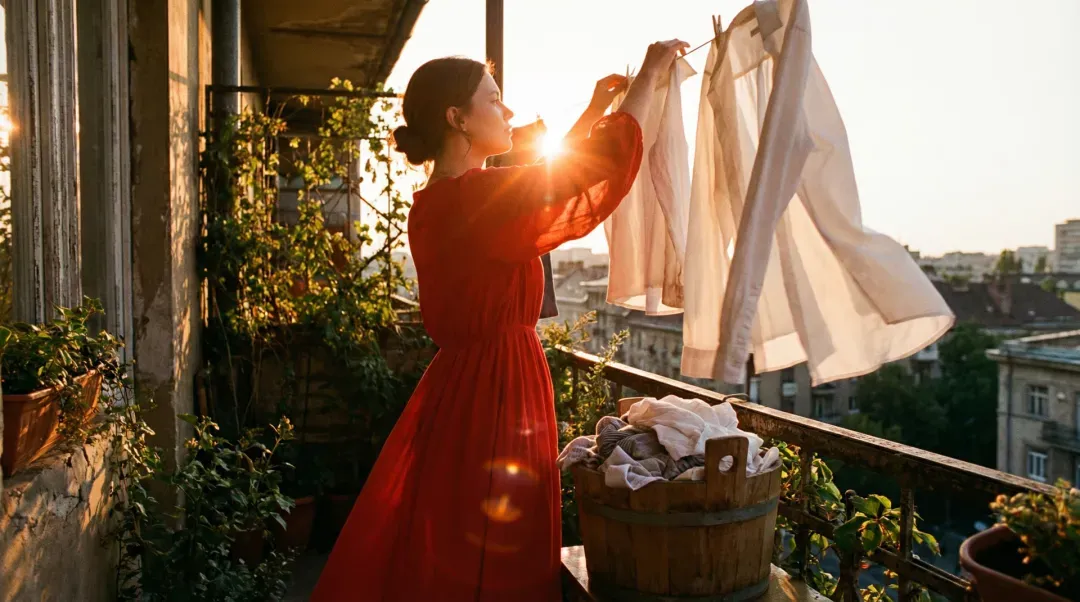
Prompt:
A girl is elegantly hanging clothes to dry. After finishing, she takes another item out of the bucket and vigorously shakes it.

Prompt:
A man (@Image 1) walks wearily down the hallway after getting off work. His pace slows, and he finally stops at his front door. A close-up shows him taking a deep breath and relaxing. He finds his keys, unlocks the door, and enters. His daughter and pet dog run over to greet him. The interior feels warm and intimate, with natural dialogue throughout.
Prompt:
The camera follows a man dressed in black as he flees at high speed. A sudden cut shows a side angle as he panics, knocks over a fruit stand, stumbles, and continues running.
These examples highlight how Seedance AI handles emotion, pacing, camera language, and physical interaction within a single coherent sequence.
Pitfall Avoidance Guide
- Always use @ tags correctly. Without them, Seedance 2.0 cannot identify reference intent.
- Double-check @ tag labels, especially when using many materials.
- Match extension duration precisely to the desired output length.
- Avoid long reference videos; the 15-second cap favors short, focused clips.
- Generate multiple times—randomness is inherent in any Seedance AI video generator.
- Start simple: one image plus text. Gradually add video and audio as you gain confidence.
Important Notes
When working with complex projects in Seedance 2.0, ensure all materials are clearly labeled. Chronological prompt descriptions help the model better understand pacing and narrative flow. Audio references are optional—existing video sound can be used directly.
Summary
Seedance 2.0 is not a minor iteration—it represents a structural shift in AI video creation. By unifying text, images, video, and audio into a single controllable workflow, it enables creators to move from inspiration to final output with unprecedented precision.
With stronger continuity, deeper control, and true editability, it marks a major step toward director-level AI filmmaking. The next-generation Seedance 2.0 video generator is coming soon to WaveSpeedAI—stay tuned.

You Might Like

PixaryAI vs. Undress.app: Which Is the Superior AI Tool for Adult Content Creation?
I’ll be honest — I kept seeing PixaryAI and Undress.app everywhere recently. People were sharing results, arguing about which one looks more realistic, and dropping comparisons between deepnude AI tools nonstop. So I finally gave in and spent some time actually testing both platforms side-by-side. I didn’t start this with a favorite in mind. My goal was super simple: use the same types of inputs, try similar features, compare the output quality, and see which AI nude generator is on top. And
PixaryAI vs. SeaArt AI: Which Undress Tool Gives the Best Deepnude Results?
If you’ve ever gone down the rabbit hole of AI undressing tools, you already know the struggle: some look promising, others claim “deepnude-level realism,” but most fail the moment you upload a real photo. So I decided to run a head-to-head test between two of today’s most talked-about undress AI tools—PixaryAI and SeaArt AI—to see which one can actually deliver believable nude results. Using the built-in templates, and the same workflow, I pushed both platforms through a full evaluation: ease

10 Best Free AI Video Generators Online (2026 Updated)
Imagine this: a single image or a quick prompt turns into a full-fledged video—camera moves, music, and all—without you touching a timeline. That’s the magic of today’s AI video generators. From image to video AI to multi shot AI video, these tools let you create cinematic, shareable content in minutes, even if you’ve never opened Premiere or Final Cut. Check out our top 10 free AI video generators for 2026, carefully tested and compared for speed, quality, and creative freedom. Try Free AI Vi
