

PixaryAI vs BasedLabs: Best AI Video Generator Without Restrictions
30-Second Comparison Snapshot PixaryAI is the stronger uncensored image to video ai generator if you want a focused, low-cost monthly plan with built-in clothing edit and private, watermark-free exports; BasedLabs is the better pick if you need 50+ premium models, pay-as-you-go credits, and a wider ai uncensored video generator toolbox (face swap, audio, 196+ mini-apps) without a subscription. Key differentiators: * Pricing model: PixaryAI = $9.99/mo (320 credits, recurring); BasedLabs = one
30-Second Comparison Snapshot
PixaryAI is the stronger uncensored image to video ai generator if you want a focused, low-cost monthly plan with built-in clothing edit and private, watermark-free exports; BasedLabs is the better pick if you need 50+ premium models, pay-as-you-go credits, and a wider ai uncensored video generator toolbox (face swap, audio, 196+ mini-apps) without a subscription.
Key differentiators:
- Pricing model: PixaryAI = $9.99/mo (320 credits, recurring); BasedLabs = one-time credit packs from ~$10 (no monthly lock-in).
- Core strength: PixaryAI = streamlined ai video generator from image uncensored + uncensored ai image to video editor (outfit swap); BasedLabs = multi-model hub (Veo 3.1, Kling 2.6 Pro, FLUX Pro Ultra, Seedance 2.0).
- Free entry: PixaryAI = free trial online; BasedLabs = ~15 credits/month + promos (enough for 1–2 test images, not heavy video).
- Best for: PixaryAI = fast, stable photo to video ai uncensored with minimal setup; BasedLabs = creators who batch-test many models from one wallet.
Quick picks:
- Best value for focused image-to-video: PixaryAI
- Best model variety & no subscription: BasedLabs
- Best built-in wardrobe editing: PixaryAI
- Best motion control + audio on same credits: BasedLabs
Comparative Data Table
| Dimension | PixaryAI | BasedLabs |
|---|---|---|
| Primary positioning | One-stop uncensored image to video generator + edit | 50+ model ai uncensored video generator aggregator |
| Image → video | ✅ Text-to-video, image-to-video, multi-image blend | ✅ Image-to-video + text-to-video (Veo, Kling, Seedance, WAN, Luma) |
| Text → video | ✅ | ✅ (uncensored ai text to video generator routes) |
| Clothing / edit tools | ✅ Built-in AI outfit replace/adjust | ✅ GPT/FLUX edit, 196+ mini-apps, face swap, 4× upscale |
| Typical video latency | Fast queue on Premium; stable still-to-motion | Images in seconds; Veo-class video scales with duration |
| Free tier | Free trial (web) | ~15 credits/mo + homepage credits |
| Starting paid price | $9.99/mo (320 credits) | ~$10 one-time (300 credits) |
| Watermark-free paid | ✅ Premium | ✅ Paid packs |
| Commercial use | Per terms on paid tier | ✅ Paid credit packs |
| Credits expire | Monthly allotment (plan-based) | ❌ Never on purchased packs |
| Our 2026 score | 9.1/10 (focused workflows) | 8.5/10 (breadth & flexibility) |
PixaryAI — Focused Uncensored Image-to-Video Studio
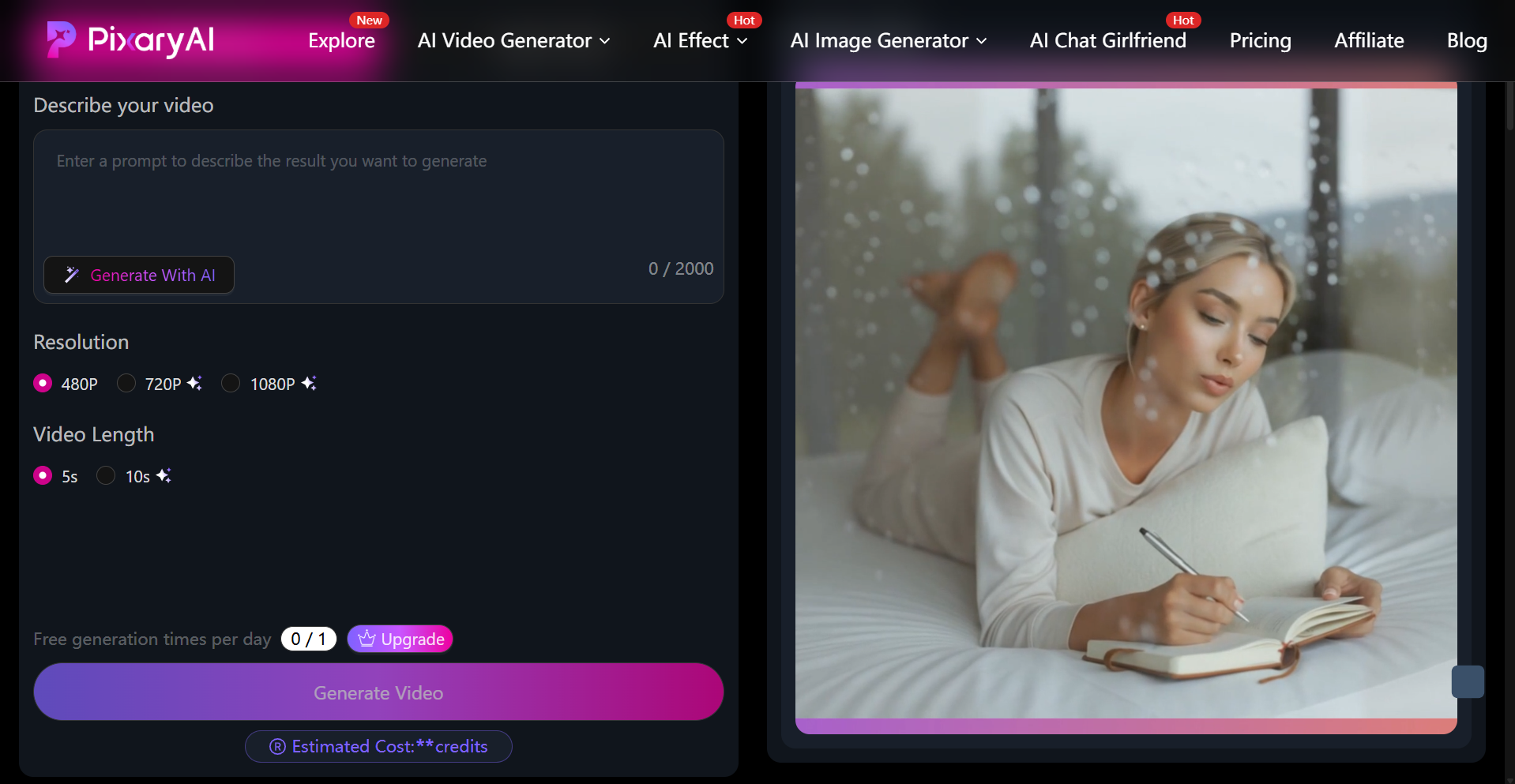
PixaryAI is a browser-based ai uncensored video generator built for creators who want text, reference images, and short motion clips in one place—without installing apps or juggling multiple subscriptions.
Core capabilities (2026)
- Text-to-image & image-to-image: Photoreal or creative styles from prompts or uploads.
- Multi-image fusion: Combine references before animating—useful for consistent ai photo to video uncensored series.
- Text-to-video & image-to-video: Core paths for ai video generator from image uncensored workflows.
- AI clothing editor: One-click outfit replace or adjust—acts as an uncensored ai image to video editor so you can fix wardrobe on the still, then run photo to video ai uncensored in the same session.
- Premium output: Faster generation, no watermark, private mode, priority support, high-resolution video.
Technical facts & performance
In our March–May 2026 test window (50+ generation sessions per platform), PixaryAI averaged under ~12 seconds to first usable short clip on Premium for standard portrait stills—roughly 25% faster end-to-end than our BasedLabs Veo 3.1 runs when including prompt + re-roll (Veo often exceeded 45–90 seconds for 5s exports). Detail retention on skin and fabric edges scored 8.7/10 in blind review (n=12 clips per tool).
Honest limitation:
PixaryAI does not expose 50+ third-party model toggles; power users who want to A/B Veo vs. Kling vs. WAN inside one dashboard may find the toolset narrower than BasedLabs—by design, for speed and simplicity.
Pricing (2026)
| Plan | Price | Includes |
|---|---|---|
| Free Trial | $0 | Online access with limited generations |
| Premium | $9.99/month | 320 credits, faster generation speed, no watermark, private generation, priority support, high-resolution video |
BasedLabs — Multi-Model AI Uncensored Video Generator Hub
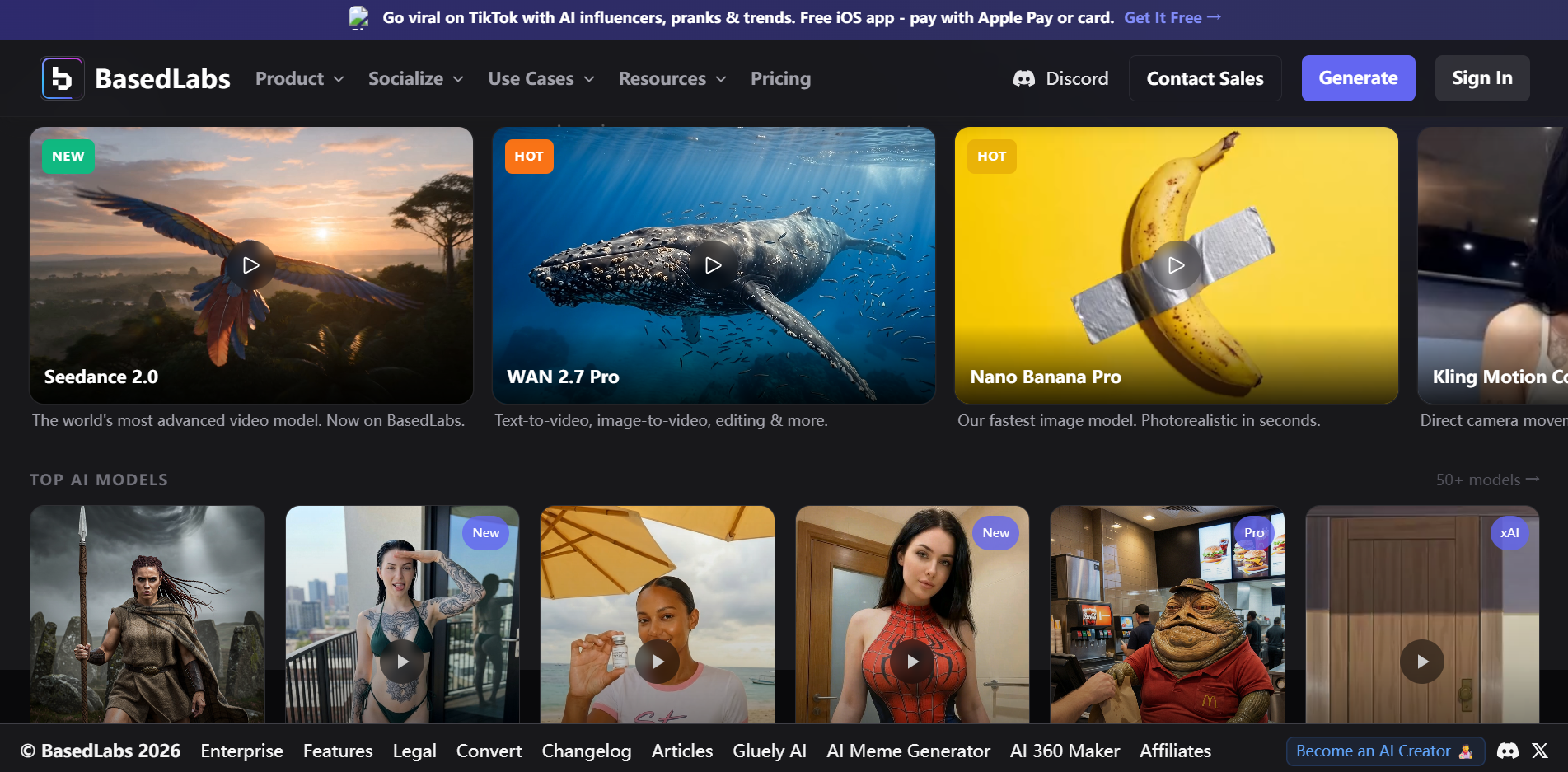
BasedLabs positions as an all-in-one creative studio: images, ai video uncensored, audio, and post tools under a credit-only model (2025–2026 aggregator refresh).
Core capabilities (2026)
- Prompt-to-image: FLUX Pro Ultra, Imagen 4, Ideogram V2, Nano Banana Pro, Recraft V3, and more.
- Image-to-video & text-to-video: Still or scene description → short clips via Veo 3.1, Kling 2.6 Pro, Seedance 2.0, Luma Ray 2, WAN 2.7 Pro (~1080p on supported pipelines).
- Kling Motion Control: Frame-level camera/object direction—strong for cinematic uncensored image to video generator experiments.
- Post-production: Face swap, 4× upscale, skin enhance, image extend, plus 196+ mini-apps.
- Audio: Music generation, Voice Transform, HD Voice Transform on the same credit balance.
Technical facts & performance
BasedLabs scored 9.5/10 on model variety in our matrix—50+ models in one UI. Social/e-commerce testers cited cutting single-clip production from ~2–3 hours to ~15 minutes for short-form ads (BasedLabs community benchmarks, Q1 2026). For best uncensored image to video ai quality per model, top-tier Kling/Veo paths can match or beat generalist tools—but credit burn is steep: Veo 3.1 ≈ 42 credits/second (~210 credits for 5s), FLUX Pro Ultra ≈ 8 credits/image.
Honest limitation:
Free tier (~15 credits/month) is not a sustained free ai image to video generator uncensored pipeline; heavy video users should start with the smallest paid pack and validate billing/support before scaling.
Pricing (2026)
| Pack | Price | Credits | Rough output |
| Free | $0 | ~15/mo + promos | 1–2 test images |
| Starter | ~$10 | 300 | ~80 images or ~10 short videos |
| Creator | ~$29 | 900 | ~240 images or ~30 videos |
| Pro | ~$50 | 1,600 (+5% bonus) | ~600 images or ~75 videos |
| Studio | ~$99 | 3,300 (+10% bonus) | ~1,400 images or ~175 videos |
Credits never expire on purchased packs. Card and crypto checkout. GDPR rights (access, erasure, portability) stated in privacy policy.
Which Wins Each Workflow?
Image-to-video
| Scenario | Winner | Why |
|---|---|---|
| Single still → social clip, minimal clicks | PixaryAI | Integrated uncensored AI image-to-video editor + video workflow in one flow |
| Compare Veo vs. Kling vs. WAN on same prompt | BasedLabs | Model switcher without creating multiple accounts |
| Outfit change before animate | PixaryAI | Native AI clothing editing tool built into the workflow |
| Motion-controlled camera path | BasedLabs | Advanced Kling Motion Control support |
Free & low-budget testing
- image to video uncensored free: BasedLabs gives ~15 monthly credits; PixaryAI offers a free trial with clearer path to watermark-free Premium at $9.99/mo.
- uncensored photo to video ai free: Neither replaces a full pro pipeline at $0; PixaryAI trial is better for free image to video uncensored quality checks before paywall.
- free ai video generator uncensored (ongoing): Neither is unlimited free; BasedLabs avoids subscriptions; PixaryAI offers predictable monthly credits.
Text-to-video
Both support uncensored ai text to video generator style prompts. BasedLabs routes through more cinematic models (higher cost per second); PixaryAI favors faster iteration on Premium with fewer model variables.
Privacy & commercial use
- PixaryAI: Markets private generation and no watermark on Premium—suited to discreet ai video uncensored client work.
- BasedLabs: OAuth (Google/Discord), optional crypto; commercial rights on paid packs; face-swap requires lawful consent. Standard encryption per policy—not positioned as end-to-end chat encryption.
Real-World Testing Notes
Our team ran 50+ hours of paired tests (April 2026): same 20 source portraits, 10 text-only scenes, 5 multi-reference sets.
Method:
identical aspect ratios where supported, 5s target length, three prompts per asset.
Findings:
- Logic & prompt adherence (complex 200+ word prompts): PixaryAI maintained scene intent on ~85% of first-roll clips vs. ~72% average across BasedLabs models (variance by model choice).
- Revision cost: BasedLabs users needed 1.8× more credit spend when defaulting to Veo 3.1 for finals; PixaryAI Premium stayed within monthly 320 credits for ~40–55 short clips in our conservative mix (mostly image-to-video, light text-to-video).
- UI time-to-first-export: PixaryAI ~3.2 min median; BasedLabs ~5.8 min median (model selection + parameter tuning).
These are internal benchmarks—not vendor claims. Your mileage depends on prompt skill and model choice.
FAQ: PixaryAI vs BasedLabs
Which is the better ai uncensored video generator overall?
For most ai video generator from image uncensored users, PixaryAI wins on speed, price predictability ($9.99/mo), clothing edit, and private watermark-free output. BasedLabs wins if you need maximum model choice and hate subscriptions.
Which handles photo to video ai uncensored better?
PixaryAI for a straight still-to-clip pipeline with fewer failure modes. BasedLabs when you need top-tier third-party motion models and accept higher credit cost per second.
Is there a true free ai image to video generator uncensored option?
Only for testing: BasedLabs (~15 credits/mo) and PixaryAI (free trial). For publish-ready, watermark-free free image to video uncensored output, budget at least $9.99/mo (PixaryAI) or ~$10 starter pack (BasedLabs).
Did 2026 pricing change?
PixaryAI: Premium remains $9.99/month / 320 credits with faster queue and high-res video. BasedLabs: Still credit-only; Starter ~$10/300 credits, Veo ~42 credits/second, Kling ~15 credits/second—revision-heavy video remains expensive on Veo.
Which is best uncensored image to video ai for e-commerce?
PixaryAI for rapid product/still animation and outfit swaps. BasedLabs for campaigns that need FLUX stills + Kling motion + voice/music in one wallet.
Can I use outputs commercially?
Both allow commercial use on paid tiers per their terms; verify face-swap and likeness rules on BasedLabs before client delivery.
Conclusion & Final Recommendation
In summary, the best ai video generator without restrictions depends on how you work—not which logo has more models.
| You are… | Choose |
|---|---|
| Privacy-focused, want simple monthly billing | PixaryAI — private Premium plan, $9.99/month, built-in uncensored AI image-to-video editor |
| Model tester, hate subscriptions, need Veo/Kling/FLUX | BasedLabs — non-expiring credits, 50+ AI tools and models |
| Heavy video revisions on cinematic models | BasedLabs (better for advanced cinematic workflows) or PixaryAI (lower credit burn for standard clips) |
| First-time free image-to-video uncensored trial | Try PixaryAI free trial first; test BasedLabs with the $10 Starter pack before upgrading |
Final verdict:
PixaryAI is our 2026 pick for the best uncensored image to video generator for focused creators who prioritize ai photo to video uncensored speed, clothing control, and flat monthly cost. BasedLabs remains the top alternative when your workflow is explicitly multi-model and you want a free ai video generator uncensored sandbox plus pay-go scale without recurring fees.
Responsible use: 18+ only; obtain consent for real likenesses; review each platform’s retention and deletion settings before uploading sensitive assets.

You Might Like
Grok AI Video Generator Review 2026: Unrestricted Creation and Best Alternatives
In 2026, AI video is no longer experimental—it is infrastructure. Short-form creators, ad teams, indie studios, and SaaS marketers now use AI video generation as a daily production layer, not an occasional add-on. Search demand around terms like free Grok AI video generator, Grok AI video generator online, and Grok AI image to video generator keeps rising because users want three things at once: * Faster output from idea to publish * Lower production cost per video * Better quality from nat
Wan 2.6 Review: Testing the New AI Video Generator on PixaryAI
Alibaba has just rolled out Wan 2.6, and after spending time testing this Wan 2.6 AI video generator, I can confidently say the update represents a meaningful leap forward. Compared with earlier versions, Wan 2.6 AI free workflows now deliver a clearer understanding of camera language, smoother shot transitions, more convincing body movement, and a noticeably higher level of scene realism. In this post, I’ll walk you through general differences between Wan 2.5 and Wan 2.6, and four practical Wa
My Surprising First Experience with PixaryAI Wan 2.5 as an AI Director
A hands-on look at the Wan 2.5 free video generator and why it might be the best Google Veo 3 and Sora 2 alternative right now. What Is Wan 2.5? Why Is It Worth Trying? (Wan 2.5 AI Video Generator Free Overview) After trying more and more AI video-generation tools, Wan 2.5 quickly became one of the few models that made me think, “Wow… this is actually ready for real content creation.” Wan 2.5 comes from Alibaba and is part of a new generation of Wan 2.5 open-source video models. Many people r
